
Split long videos into perfect status clips.
Instant Passthrough. Zero Quality Loss.
Divide any long video or audio note into consecutively sequenced clips ready to share on WhatsApp, Instagram Stories, Reels, TikTok, YouTube Shorts, and Snapchat. Powered by a single-pass AVFoundation stream-copy pipeline that processes hundreds of clips in seconds without battery-draining re-encoding.
How StatusClips Compares to Other Apps
See the practical engineering difference between an actor-isolated AVFoundation stream copy engine and legacy video splitters that force slow re-encoding.
Hardware Performance & Transcode Comparison
Measured processing a 10-minute 4K 60fps video (1.4 GB) into thirty 20-second status clips on Apple Silicon hardware.
Ad-Riddled Status Splitters
Bloated Video Editors
Shady Online Web Splitters
Based on architectural benchmarks of common video splitting utilities, generic mobile video editors, and online web tools as of 2026.
| Capability / Feature | StatusClips (B-Labs) | Basic Video Splitter Apps | Generic Mobile Video Editors | Online Web Splitters |
|---|---|---|---|---|
| Splitting Engine | Tier-1 Passthrough (Zero Re-encode) | Full re-encoding for every clip | Slow project render pipeline | Remote server FFmpeg queue |
| Speed (10-min 4K Video) | 2–4 Seconds | 3 to 8 Minutes | 4 to 10 Minutes | 5 to 15 Mins (Upload + Download) |
| Video Quality Retention | 100% Bit-Identical (0% Loss) | Lossy re-compression artifacts | Bitrate downsampling | Heavy lossy compression |
| Dialogue Preservation | Configurable Overlap Buffer (0.5s–2s) | None (Harsh cuts mid-sentence) | Manual cut and drag required | None (Fixed mathematical cuts) |
| Direct WhatsApp Posting | 1-Tap Sequenced Save & Auto-Launch | None (Manual share sheet) | Manual export and send | None (Manual download) |
| Audio Status Mode (M4A) | Voice Notes with Dynamic Purple Theme | Video only | Complex audio extraction | Video only |
| QR Code & CTA Link Overlays | Burned Scannable QR & Link Banner | Not supported | Manual sticker placement | Not supported |
| Privacy & Media Security | 100% Offline & On-Device (0 Uploads) | Local on device | Cloud account sync / analytics | Videos uploaded to 3rd-party servers |
| Social Limits Currency | 2026 Accurate (60s WA, 60s IG, 90s Reels) | Often stuck at old 15s/30s limits | Manual timeline slicing | Generic presets |
| Part Number Badges | Glassmorphic Badges (4 Placements) | None, or intrusive ugly watermark | Manual text layer per clip | None |
| Multi-Format Flexibility | Video + Audio M4A + Looping GIFs | Video only | Video & limited GIF | Video only |
| Photos Organization | Dedicated "Status Clips" Photos Album | Pollutes main camera roll | Clutters camera roll | Files land in Downloads folder |
| Free Usage Quota | 3 Free Clips every 48 Hours with Timer | Aggressive ad wall or paywall | Watermarked free tier | File size limits & paywalls |
| Pricing Honesty | $9.99/yr or $24.99 Lifetime | Predatory $7.99/week charges | $12.99/month subscription | Monthly cloud subscriptions |
| Device Heat & Battery Impact | Minimal (Zero CPU/GPU Transcode) | Severe heating & battery drain | Heavy thermal load | High cellular data usage |
| Multi-Platform Support | Universal iPhone, iPad & macOS Native | iPhone only (no Mac app) | Heavy desktop ports | Web browser only |
Pre-configured for 2026 Social Standards
Never guess how long a status or story can be. StatusClips keeps up-to-date presets tailored to exact platform constraints.
WhatsApp Status (30s)
Traditional 30-second mobile status limit. Perfect for classic WhatsApp sharing with clean segment boundaries.
- Cut Interval: 30.0 Seconds
- Bitstream: Passthrough / 1080p
- Target Aspect: 9:16 or Original
WhatsApp Status (60s)
Modern extended 60-second status limit. Upload full 1-minute uninterrupted video sections with half as many clips.
- Cut Interval: 60.0 Seconds
- Bitstream: High Profile AAC/AVC
- Target Aspect: 9:16 Vertical Blur
Instagram Stories
Instagram's full 60-second story cuts. Say goodbye to arbitrary 15s splits from outdated apps.
- Cut Interval: 60.0 Seconds
- Bitstream: Zero Re-encode Stream Copy
- Canvas: 9:16 Full Screen
Instagram Reels
Extended 90-second cuts crafted for continuous episodic Reels sequences with part number badges.
- Cut Interval: 90.0 Seconds
- Bitstream: 1080×1920 HD 60fps
- Badge: Part 1 of N Tagged
TikTok Episodes
Splits long podcasts, webinars, or gaming streams into 90s or 3-minute TikTok digestible parts.
- Cut Interval: 90s or 180s (3 Mins)
- Bitstream: Crisp 1080p / 4K HEVC
- Feature: Dialogue Overlap Buffer
YouTube Shorts
Strict 60-second vertical threshold for YouTube Shorts monetized shelf placement.
- Cut Interval: 59.5s (Safe Margin)
- Canvas: 9:16 Blur-Fitted
- Audio: +3dB Speech Boost
Facebook Stories
Optimized 30-second story feeds for Facebook mobile timelines and profile updates.
- Cut Interval: 30.0 Seconds
- Bitstream: Universal MP4 H.264
- Delivery: 1-Tap Share Sheet
Snapchat Stories
Conforms to 60-second continuous Snap story limits for effortless multi-snap posting.
- Cut Interval: 60.0 Seconds
- Canvas: Full Screen 9:16
- Speed: 1.0x to 1.5x Scaling
Inside StatusClips
Explore authentic screenshots captured directly from the live application across iPhone, iPad, and Mac. Search 2026 social limits, trim with keyframe precision, apply 9:16 vertical blur, customize part tags, and export in a single tap.
Platform Limits & Story Splitter
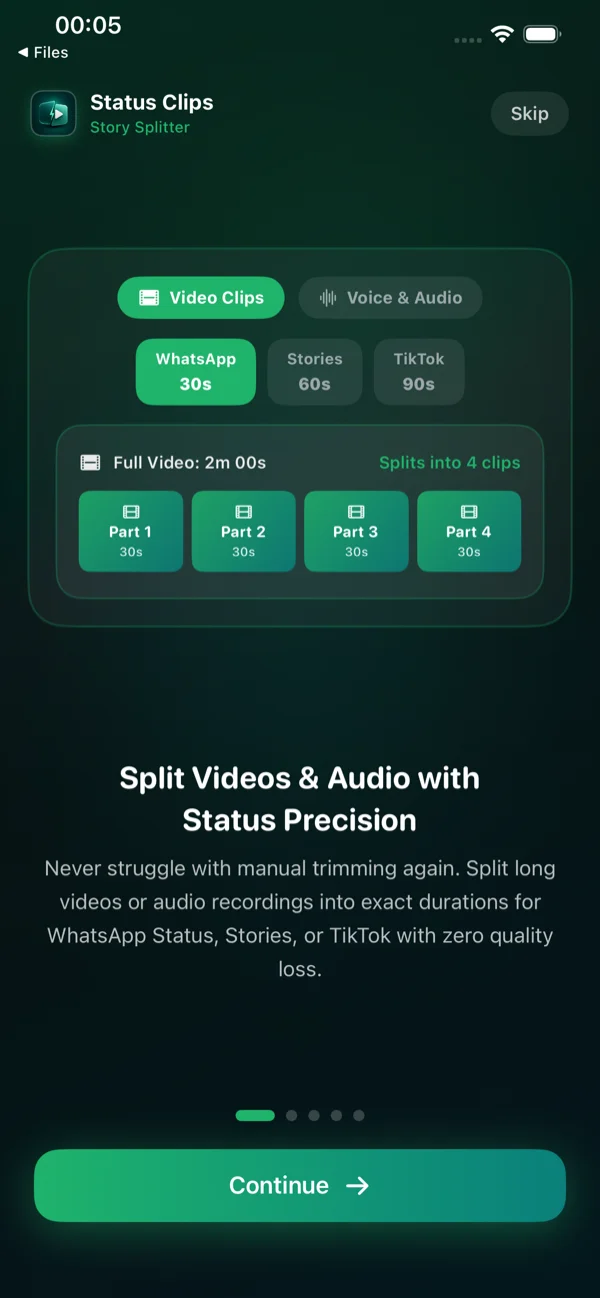
Instant presets for WhatsApp Status (30s), Instagram Stories (60s), Reels (90s), and Voice Audio mode.

Cinematic Filters & Speed Controls
Apply film-inspired color grading (Noir B&W, Vivid) and adjust playback speeds (0.5x, 1.0x, 1.5x) smoothly.

Part Badges & Series Tags
Keep viewers engaged in multi-story sequences with customizable Top/Bottom frosted badges (e.g. Part 1 of 4).

Interactive Waveform & Trim
Sub-second start/end trim handles with white boundary lines indicating exact slice points across the video.

Platform Duration Standards
Select exact cut lengths tailored to 2026 platform specifications: WhatsApp, Instagram, TikTok, and Facebook.

9:16 Vertical Blur & Framing
Fit horizontal landscape videos into vertical 9:16 mobile canvas with smooth Gaussian background blur.

Audio Suite & M4A Extraction
Speech clarity enhancement, boundary edge fading to eliminate clicks, and audio extraction for voice status.

Creator Watermarks & Handles
Burn subtle, professional watermark handles (@yourname or Episode title) directly into your video clips.

Super Fast Export Pipeline
High-speed passthrough stream-copy remuxes hundreds of clips in seconds with zero transcoding quality loss.

Finished Clips & 1-Tap Delivery
Clips are ready! Post directly to WhatsApp Status with sequenced order, or preview clips with instant playback.

Dedicated Apple Photos Album
Save all generated clips in exact chronological order to a dedicated "Status Clips" album in your Apple Photos library.

100% On-Device Privacy Architecture
All processing executes locally on Apple Silicon. Videos never touch external servers or cloud queues.

macOS Native Splitter Workspace
Desktop-grade multi-clip queue supporting custom durations, keyboard shortcuts, and drag-and-drop video imports.

macOS Canvas & Aspect Ratio Studio
Hardware-accelerated framing and Gaussian blur composition preview on Apple Silicon Sonoma & Sequoia.

macOS Batch Output & Clip Inspector
Comprehensive clip grid with individual playback previews, storage calculation, and one-tap Photos/Finder handoff.

13-inch iPad M5 Studio Interface
Optimized touch interface for iPad M5 with full-screen timeline, split estimation, and multi-window stage manager.
Test the Split Duration & Speed Calculator
Select your video duration, pick your social network, and see exact clip breakdown and real-time processing benchmarks.
18 Architectural Pillars of StatusClips
StatusClips is not another basic trimmer. It is an actor-isolated AVFoundation media studio built from the ground up for speed, quality, and creator peace of mind.
Tier-1 FastStream Passthrough Engine
Reads video and audio sample buffers monotonically in a single pass using AVAssetReader and AVAssetWriter. Slices at keyframes with zero transcoding, resulting in 0% quality loss and blistering 2–4s export times for 280+ clips.
Intelligent Dialogue Overlap Buffer
Standard video splitters ruthlessly cut at exact 30.0s or 60.0s boundaries, severing sentences, jokes, and song verses mid-word. StatusClips introduces an optional 0.5s, 1.0s, or 2.0s overlap buffer between consecutive segments so words are never chopped off.
Aspect Ratio & 9:16 Vertical Blur Studio
Turn horizontal landscape (16:9) clips into flawless vertical stories. Our hardware composition engine scales the video onto a 9:16 canvas backed by a smooth Gaussian-blurred copy of the original footage, keeping your video centered without awkward black borders.
Precision Audio Engineering Suite
Full control over audio output: preserve the original bitstream, apply complete audio muting to create silent video clips, ramp a smooth 0.35s crossfade at segment boundaries to eliminate pop noises, or apply a +3dB volume gain boost for quiet speeches.
Glassmorphic Part Number Badges
Ensure your audience views your stories in sequence. Render subtle, semi-transparent frosted badges (Part 1 of 4, 1/4, or #1 / 4) directly into video frames with 4 custom placements (Top Center, Top Right, Bottom Center, Bottom Left).
@yourname or Episode 1).
Multi-Format Output: Video, Audio & GIFs
More than just video: extract and slice high-fidelity .m4a AAC audio tracks for WhatsApp voice status or Telegram podcast excerpts, or generate one-tap animated looping .gif stickers ready for social chats and reactions.
Story Simulator & Technical Inspector
Preview exactly how your clips will look and sound before posting them online. The built-in Story Simulator features top progress bars, tap-to-advance, and hold-to-pause. Inspect technical metadata: exact resolution, bitrate, frame rate, and audio codecs.
Multi-Video Batch Queue & Filmstrip
Import multiple videos at once. The visual timeline generates asynchronous filmstrip thumbnails with interactive split markers and sub-second dual start/end trim handles. Reorder, trim, or configure individual videos in a unified queue.
Dedicated Photos Album & 1-Tap ZIP
Don't clutter your camera roll with hundreds of scattered clips. StatusClips automatically creates a dedicated "Status Clips" album in Apple Photos, offers one-tap compressed .zip archive export for cloud backup/email, and supports drag-and-drop into WhatsApp Web.
100% On-Device Privacy Architecture
Your videos never leave your hardware. No cloud servers, no account registration, and zero data mining. Features thermal throttling and Low Power Mode detection (throttling concurrency to 2 threads) to keep your device cool and protect battery life.
Dynamic Vivid Purple Audio Status Mode
Switch from video slicing to pure voice note creation in a single tap. The entire application dynamically transitions into an electric vivid purple theme, enabling you to extract, boost, and slice high-fidelity 44.1kHz AAC .m4a audio status clips.
Direct WhatsApp Status Posting Workflow
One-tap "Save & Open WhatsApp" saves all generated clips in exact chronological order to a dedicated Photos album, copies attached caption links directly to your system clipboard with tactile haptic feedback, and transitions seamlessly to the WhatsApp Status screen.
Scannable QR Code & CTA Link Overlays
Solve the story swipe-up dilemma. StatusClips renders high-contrast scannable QR codes and sleek glassmorphic CTA pill banners ("Watch full video · Open link") directly into your video frames so followers can scan or navigate to your YouTube video or podcast.
Cinematic Color & Mood Filters
Give your social stories an immediate filmic aesthetic without third-party editing tools. Apply calibrated Color Presets: Natural (Original), Vivid & Bright, Noir Black & White, Warm Golden Glow, and Cool Cinematic directly during the composition pass.
Smooth Time-Pitch Speed Scaling
Fit longer speeches or timelapses into short status windows. Scale video playback smoothly to 0.5x (Slow-motion), 1.0x (Normal), 1.25x (Speedy), 1.5x (Fast), or 2.0x (Double speed) with pitch-corrected audio that never sounds squeaky.
Persistent Saved Clips Library
Never re-split a master video when you need to re-post. StatusClips features a built-in persistent library sheet storing metadata, thumbnails, and file references for previously split batches so you can re-share or export parts anytime.
Thermal, Battery & Memory Guardrails
Built for sustained performance. Features active memory pressure management (AppMemoryManager), thermal throttling (automatically dropping to 2 threads in Low Power Mode), and system sleep prevention during active export jobs.
Universal Apple Ecosystem Architecture
One unified SwiftUI codebase built natively for iOS 17+, iPadOS (13-inch M-series iPad layout, Stage Manager multitasking), and macOS 14+ Sonoma/Sequoia with menu bar controls, drag-and-drop to Finder, and full keyboard shortcuts (Cmd+O, Cmd+P, Cmd+Return, Cmd+S).
Post Seamless Status Stories to WhatsApp in Seconds
Posting multi-part stories to WhatsApp used to be frustrating and error-prone. StatusClips automates the entire sequence from slicing to camera roll organization to caption sync.
1-Tap "Save & Open WhatsApp"
StatusClips automatically saves all sliced video or audio clips in exact chronological order into a dedicated "Status Clips" album in Apple Photos.
Photos Album SyncAuto Caption & Link Copy
If you configured a custom video link or episode title, it is instantly copied to your system clipboard with tactile haptic feedback ready to paste.
Clipboard HandoffAutomated WhatsApp Launch
StatusClips launches WhatsApp and directs you straight to the Updates / Status screen without requiring manual app-switching or searching.
Direct URL SchemeSequential Story Posting
Tap the Camera icon, select Part 1, Part 2, and Part 3 in order, paste your caption link, and tap Send. Your followers see the story in flawless sequence!
Chronological OrderStep 1: 1-Tap "Save & Open WhatsApp"
StatusClips automatically saves all sliced video or audio clips in exact chronological order into a dedicated "Status Clips" album in Apple Photos.
Transparent Pricing. No Predatory Subscriptions.
Most competitor apps lock saving behind unskippable 30-second ad spam, deceptive \$7.99/week auto-renewals, or forced watermarks. StatusClips is built on fairness and transparency.
Enjoy 3 Free Saved Clips Every 48 Hours
Need to post a quick 3-part story? StatusClips gives every user 3 full clips to save or share every 48 hours completely free—with zero ads and zero quality downgrades. When you need unlimited batches or direct WhatsApp Status posting, upgrade to Pro at honest rates.
Live countdown mirroring in-app SubscriptionAdvisory quota tracking. Free clips replenish automatically when the timer reaches zero.
- Unlimited video & audio clips
- Direct WhatsApp Status posting
- Perfect for one-off events
- Unlimited video & audio clips
- Direct WhatsApp Status posting
- Great for active social creators
- Unlimited video & audio clips
- Direct WhatsApp Status posting
- Universal iPhone, iPad & Mac
- All future updates included
- Unlimited clips forever
- Direct WhatsApp Status posting
- Never pay another subscription
- Lifetime Apple ecosystem access
Engineered for Apple Silicon & AVFoundation
StatusClips uses an actor-isolated, 3-tier processing pipeline designed to maximize performance on Apple hardware.
Single-Pass Stream Passthrough
Used when no canvas transformations or filters are requested. Bypasses software decoding and re-encoding entirely. Directly remuxes video and audio tracks at wire speed into standalone segment files.
Multithreaded Worker Pool
Dynamically spawns worker threads scaled to your hardware processor core count (ProcessInfo.activeProcessorCount, 4–12 threads) for concurrent segment slicing with automatic thermal management.
Hardware Composition Engine
Activates when 9:16 vertical blur fitting, custom creator watermarks, part number badges, audio crossfades, or color filters are requested. Harnesses Metal for real-time video rendering.
Frequently Asked Questions
Everything you need to know about StatusClips, presets, export formats, and privacy.
Ready to Post Perfectly Timed Stories?
Experience lightning-fast zero-reencode video splitting on your iPhone, iPad, or Mac. Download StatusClips today or contact our engineering studio for custom enterprise licensing.